Treating an AI coding agent like a new teammate
The CLAUDE.md files, skills and monitoring that turned Claude Code from a fast but forgetful helper into something I trust with real work, and the open-source dashboard I built to see where it still struggles.
Burak Karaman
6 min read
AI coding agents are fast. Out of the box they are also forgetful: every session starts from zero, so the agent runs npm test in a repo that uses Bun, hand-edits a value that should be derived, or declares a task done without running the build. You correct it, it apologises, and tomorrow it does it again.
I use Claude Code every day, at work and on side projects. What made the difference was not a better prompt. It was treating the agent the way I would treat a new teammate: give it the onboarding document, give it the team's checklists, and watch where it gets stuck so the next person doesn't.
1. CLAUDE.md: the onboarding document#
Every repo I work in has a CLAUDE.md at the root. The agent reads it at the start of each session, so anything written there survives from one session to the next.
The first version of mine described the stack. That turned out to be the least useful part: the agent can see the stack in package.json. What it can't see are the invariants, the rules that live in people's heads. In my chess club app, for example:
- Ratings are derived: they are always recomputed from the full game history, and must never be updated by hand.
- The server runs in UTC but the club lives in Berlin, so "today" must always come from the club's time zone helper, never from
new Date(). - Every mutation goes through one wrapper that checks permissions and writes the activity log.
- The agent never pushes, deploys or touches the real data file.
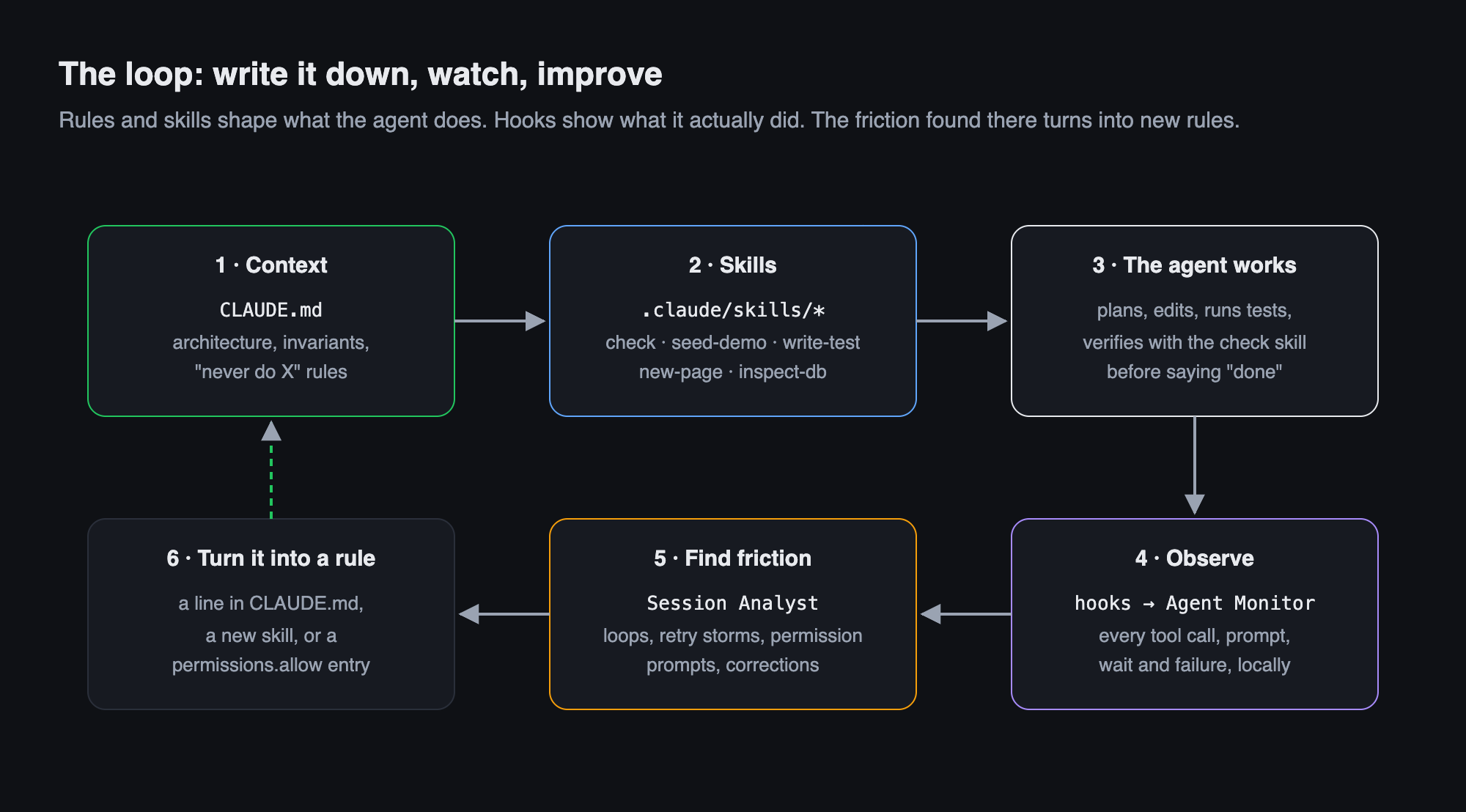
Each of these lines exists because the agent once got it wrong. That is the rule I follow now: when I correct the agent twice for the same thing, it becomes a line in CLAUDE.md. The file is less a description of the code than a list of mistakes nobody has to make again.
2. Skills: the team's checklists#
Some knowledge is not a rule but a procedure: how to verify a change, how to get realistic test data, how this repo structures a new page. For those I write skills, short instruction files in .claude/skills/ that the agent loads when a task matches their description.
The chess club repo has six:
| Skill | What it does |
|---|---|
check |
runs tests, type check, lint and build, and reports what failed |
seed-demo |
generates a realistic demo club into a separate folder and starts a second instance on it |
inspect-db |
a read-only health report of the data: orphaned references, ratings that disagree with a replay |
write-test |
writes unit tests with the shared fixtures, failing test first for bugs |
new-action |
adds a server action the way this repo does it (permissions, logging, recompute) |
new-page |
creates a page with the repo's layout and visual conventions |
Three things made skills work for me:
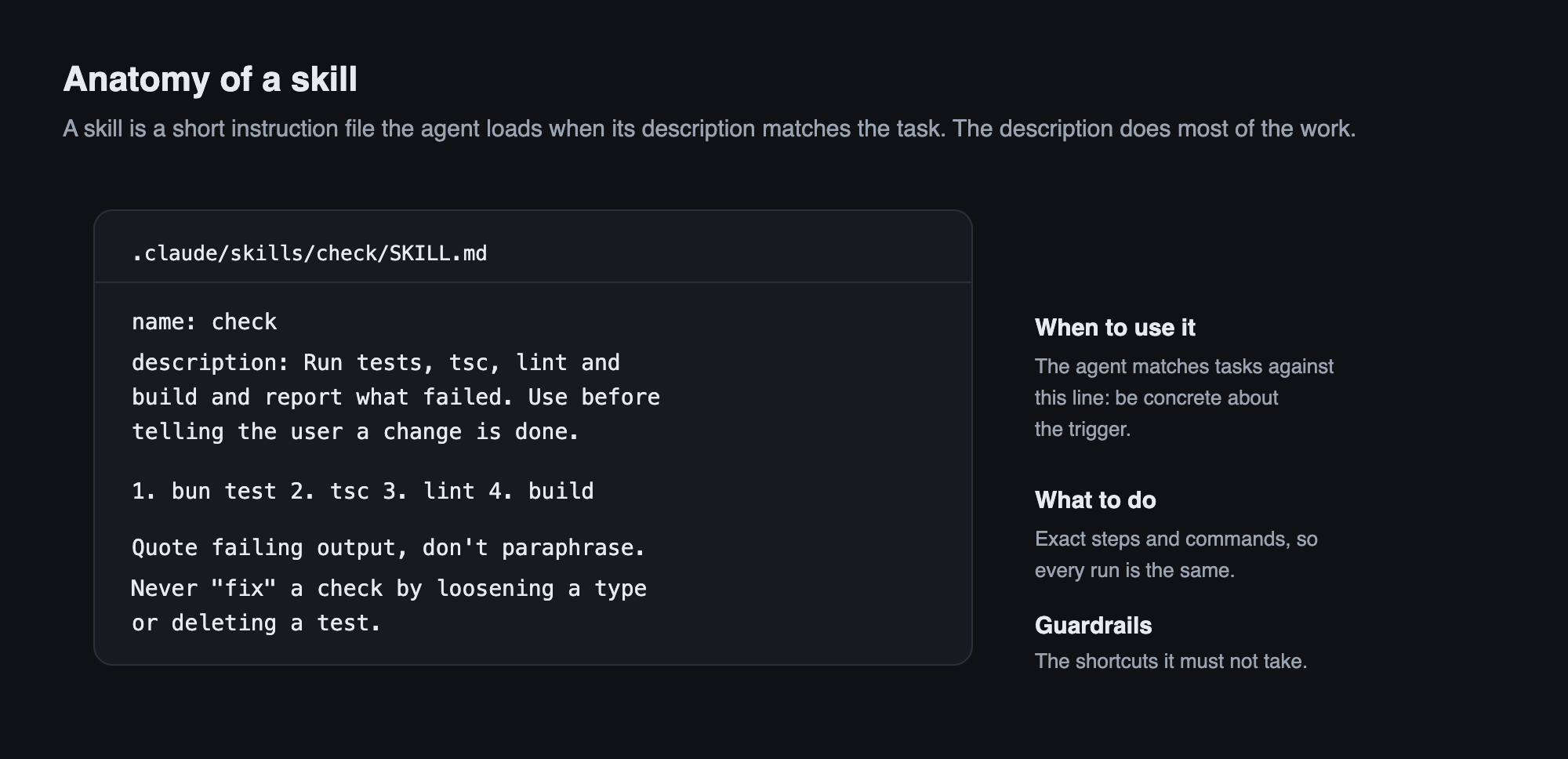
- The description is the trigger. The agent decides from that one line whether to load the skill, so it says when to use it ("before telling the user a change is done"), not just what it is.
- Exact steps beat good intentions. "Make sure it works" is vague; "run these four commands in this order and quote the failing output" is repeatable.
- Guardrails name the tempting shortcut. My
checkskill says: never make a check pass by loosening a type, adding aneslint-disableor deleting a test without saying so. That single line prevents the most expensive kind of "fix".
Skills also encode safety. seed-demo refuses to write into the real data folder, and inspect-db never modifies anything. The agent can explore freely because the dangerous paths are closed.
3. Observe: what did the agent actually do?#
Rules only help if you know which ones are missing. Reading terminal scrollback doesn't scale, especially with several sessions and subagents running in parallel. So I built Agent Monitor, an open-source, fully local dashboard for Claude Code.
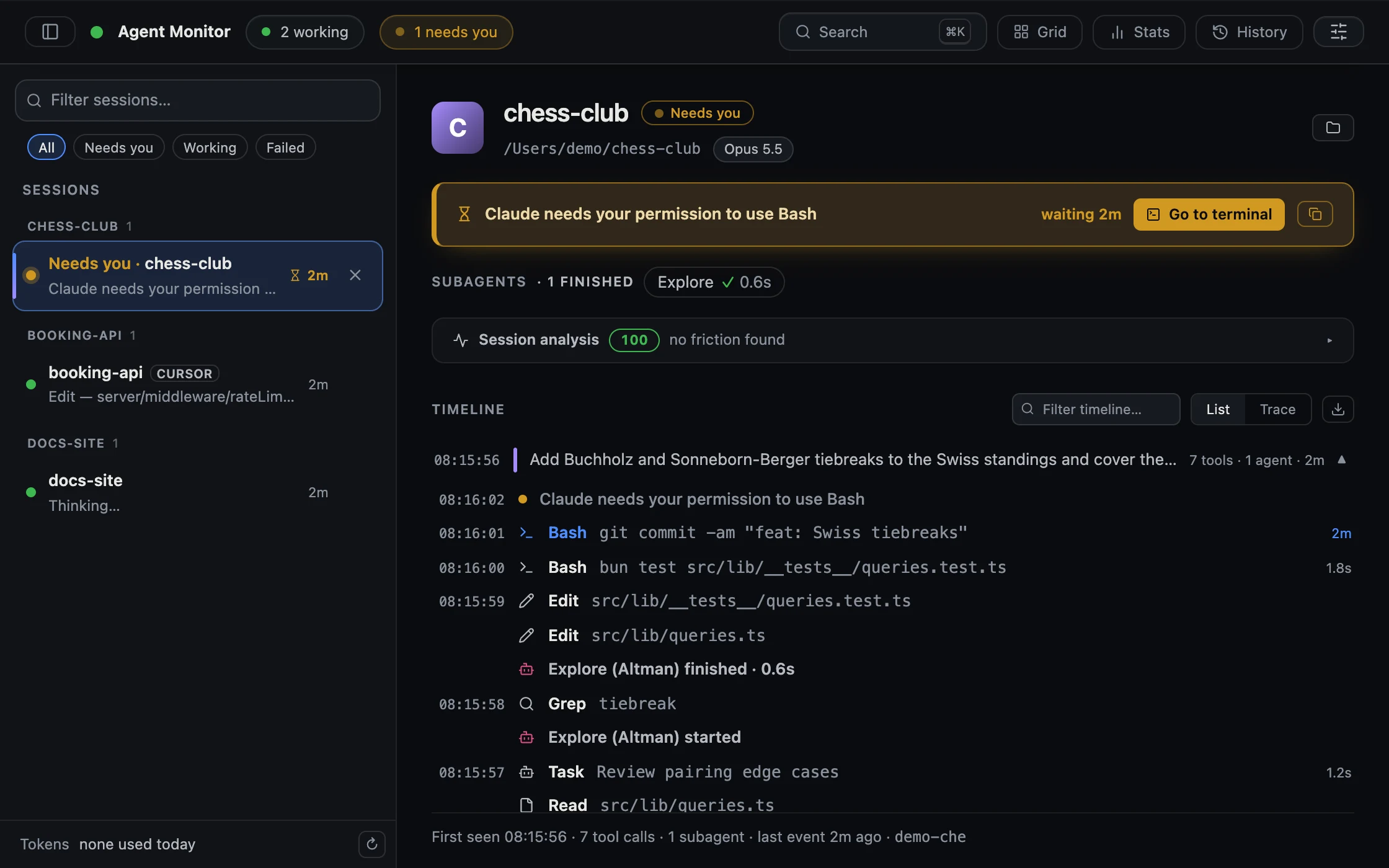
Claude Code can call a script on every event (session start, prompt, tool call, failure, permission prompt). Agent Monitor registers one small forwarder for all of them; a Bun server stores the events in SQLite and streams them to a React dashboard over Server-Sent Events. Everything binds to 127.0.0.1, so prompts and code never leave the machine.
The most useful feature turned out to be the simplest: a session list that shows which agent is waiting for me. With three sessions running, the expensive moments are not the agent's mistakes but the minutes it sits blocked on a permission prompt in a terminal I'm not looking at.
4. Find the friction automatically#
Watching a timeline still means reading. The newest part of Agent Monitor, the Session Analyst, reads it for me. It runs a set of small, deterministic detectors over a session's events:
- loop: the exact same call three or more times with nothing changing in between
- retry storm: the same kind of command failing again and again
- read thrash: the same file re-read although nothing changed it
- permission friction: prompts that one allow-rule would have skipped
- waiting: time the agent sat blocked on a permission prompt
- correction: my follow-up prompts that correct the agent ("no, that's wrong…"), in English, German and Turkish
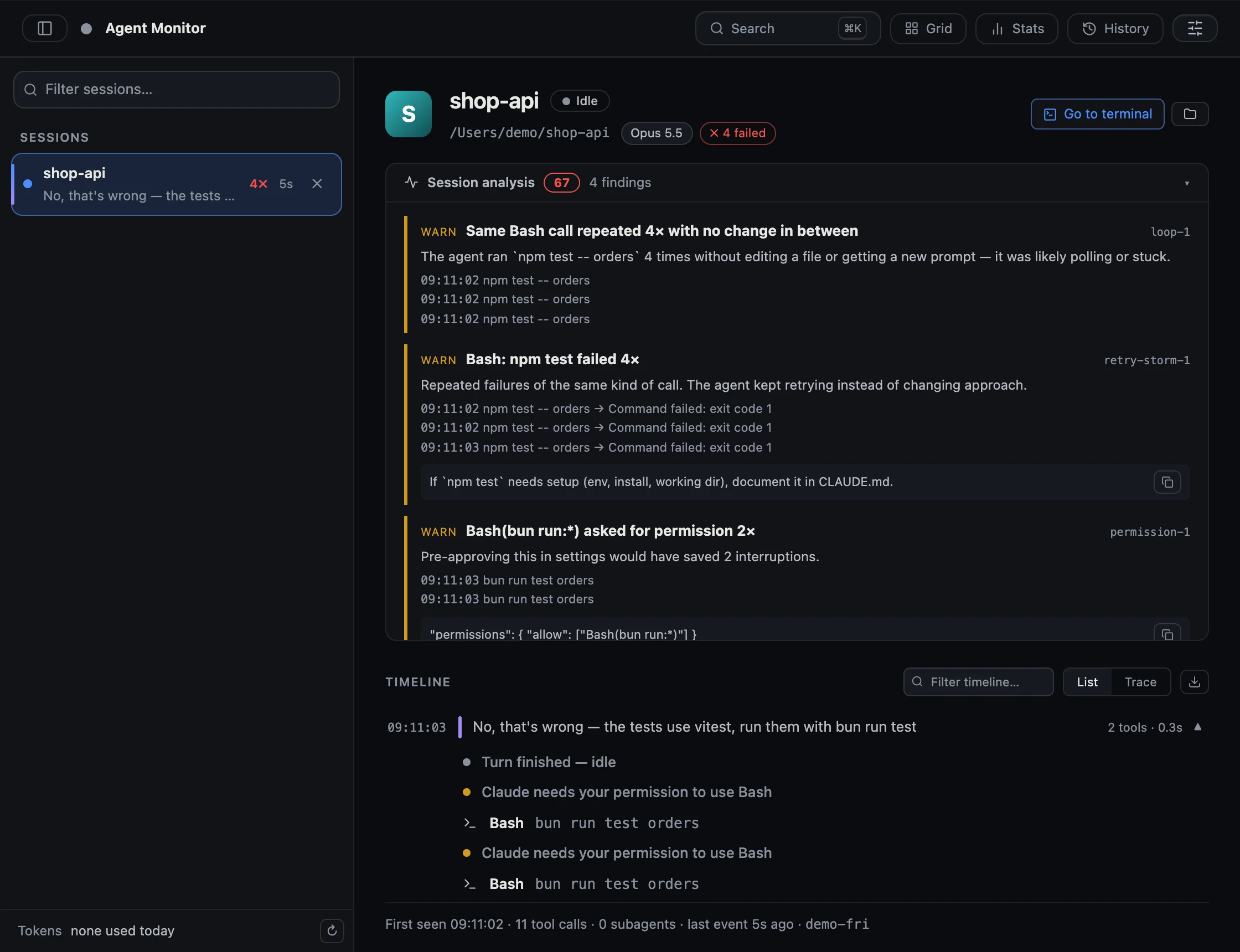
Each finding comes with evidence and, where possible, a concrete suggestion: an allow-rule to paste into settings, or a hint to document a setup step in CLAUDE.md. That closes the loop from the first diagram: the analysis tells me which rule to write next.
On top of the detectors there is an optional LLM layer that explains the findings in plain language. It is deliberately constrained: the model only receives the findings and a small digest, never raw events, and every claim it makes must cite a finding id. A validator drops anything uncited. It works with Claude, or fully locally with a small model through Ollama.
Precision mattered more than recall. I tuned the detectors against 387 of my own real sessions, and almost every first version was too noisy: idle time overnight counted as "waiting", a denied permission counted as a failure, a file rewritten by a build script counted as an unnecessary re-read. A detector that cries wolf is worse than none, because you stop looking.
And a small, honest footnote: while taking the screenshot for this post, the analyst showed a suggestion with an empty command name. Some failure events don't repeat the call's input, so the detector had nothing to name. The fix was to look the input up from the matching tool call, plus a regression test. Dogfooding works.
What I took away#
- Write down invariants, not descriptions. The agent can read the code; it can't read your head.
- Two corrections make a rule. If you've said it twice, put it in CLAUDE.md.
- Turn procedures into skills with guardrails. Name the shortcut you don't want taken.
- Close the dangerous paths (real data, pushes, deploys) so the agent can move fast everywhere else.
- Measure where it struggles. You can't improve a workflow you only see one terminal at a time.
Agent Monitor is open source: github.com/karamanburak/agent-monitor. React 19, TypeScript, Bun, SQLite, Server-Sent Events.